How a lock screen business card works
Fill in your card
Name, title, company, phone and email, plus an optional headshot and company logo. Pick colours to match your brand.
Save the wallpaper
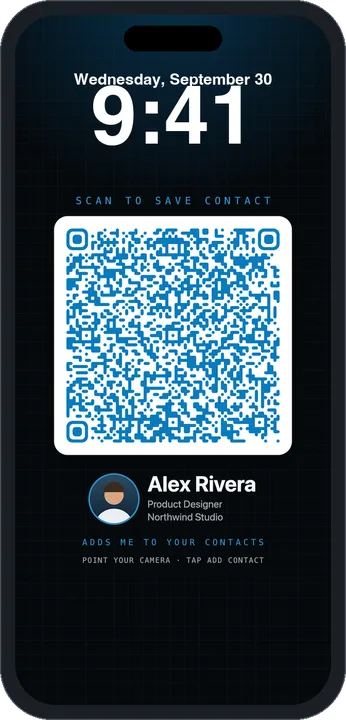
Choose your phone and tap Save lock screen. The image is sized so the clock and buttons don't cover the code.
Hold up your phone
At a conference, meetup or interview, wake your phone and let them scan. Their camera offers Add Contact with your details filled in.
Better than a link-in-QR
Most digital business cards put a URL in the QR code, which opens a web page, which then asks people to download a contact. Lockcard puts the contact itself (a standard vCard) inside the code, so it works with no signal, saves in one tap, and never expires because there's no server behind it.
Every code is checked as you edit. Lockcard decodes it the way a phone camera would and tells you if it's too dense to scan reliably.
Questions
Do people need an app to scan it?
No. The QR code contains a vCard contact, so the built-in camera on iPhone and Android shows an Add Contact button right away. There is no website to load and no app to install.
Is Lockcard free?
Yes. It's free with no account, no watermark and no limits.
Are my photo and details uploaded anywhere?
No. Everything is generated in your browser on your own device. Your details and photo are never sent to a server. The site counts anonymous page views with cookieless analytics, and nothing you type is included.
Will my headshot appear in their contacts?
A QR code is too small to carry a photo, so contacts saved by scanning won't have your picture. Your headshot does appear on the wallpaper itself, and the Contact file download includes it, which you can AirDrop or email.
Which phones does it work with?
Lockcard has presets for every current iPhone size, from iPhone 12 through iPhone 17 Pro Max and iPhone Air, plus common Android and Pixel sizes. The layout leaves room for the clock and the lock screen buttons.
Can I print it for a conference booth?
Yes. The Booth poster download is a 1080 × 1350 image with your logo, QR code and name, ready for a screen, a slide or a printed sign.
How do I set it as my lock screen on iPhone?
Save the image, open it in Photos, tap Share, then Use as Wallpaper. Turn off Depth Effect so the clock stays behind nothing, then set it as your lock screen.